


Hudl Recordings Tab
Redesigned the recordings tab feature to enable users more accessibility to users using the Hudl Focus application
Position
Product Designer
Duration
3 months
Role
Sole product designer with assistance of my design manager
Tools & Methods
Miro- Brainstorming, Ideation
Slack-Collaboration
Figma- UI design
Hudl Sync- Document database, User testing
Zoom, Dovetail- User Research, User Testing, Data Analysis
Overview

ABOUT HUDL
Hudl Agile Technologies is a performance analysis technology-based company that offers a range of tools like cameras called Focus cameras that automatically capture all the action and allow live streaming for sports teams to meet the needs at different levels, across different countries.
It is a newly released camera with the following aspects :
-
A portable camera just made for soccer
-
Built-in real-time live streaming and uploading over wifi/ethernet/4G plans.
-
Automatic uploads with no additional processing time
-
A mobile application called Hudl Focus helps connect and check recordings
I worked on
Redesigning the recordings tab to make the flex mobile application more user-friendly with basic necessary interactions to access any recording
Problem
Description
The hardware design team conducted a UX Audit on the Hudl Focus mobile application by connecting it to the Focus Flex camera for the quarterly review.
While conducting that Audit among all the issues, I came across the Recordings Tab in the focus flex application and found the following concerns:
-
No way to access the recording in the mobile application
Every recording in the recordings tab of the application can only be viewed on a desktop site.
2. Lack of basic user interactions
Editing recording details, sharing, or deleting the recording is not accessible by coaches or parents immediately.
In order to make the recordings tab more mobile user-friendly, redesigning the recordings tab is the best way to make users perform basic actions with a recording after it's upload to the user's Hudl account.
Let's look at my design process
Empathize

.png)
Ideate

Define
.png)
Test
Prototype
My role 💁🏻♀️
My responsibilities as a Product Design Intern included me do the following:
-
Extensive brainstorming with the team of designers
-
Designing, and prototyping design flows with a content designer for maintaining design consistency, accessibility parameters & keeping user constraints in mind
-
Forming a user testing protocol for usability tests with internal & external users
-
Understand Hudl users' needs and pain points by analyzing feedback data.
A glimpse of the solution
The final design approach decided to be implemented was to allow users to access their recordings within the Hudl Focus application for a timed period without the extra need to use the desktop application.
Before


After
Visual and content changes are being iterated on with respect to user & business requirements
The new design incorporates and enables:
1.
An option for the user to access, view and assess the recording right after the recording is complete
2.
Increase in efficiency with the use of the focus flex camera as well as the hudl focus application
3.
Saving time for coaches & parents by giving them immediate satisfaction on video clarity & time delay.
What do I know so far?👀
The Hudl Focus mobile application is like the camera’s command center as one can be able to calibrate their camera, manage recordings, set up live streams, and be alerted of any issues with their device.
Understanding the space on why redesigning the recordings tab was important.
Therefore with the findings from the Hardware UX Audit, flex users used the Hudl focus application to just record games and practices:
-
For viewing videos, they use the Hudl application
-
For video viewing, editing & posting purposes, they use the desktop application.
-
Only the video upload status is displayed to the user
-
No area to edit game details after starting the recording
Define
Brainstorming
As the flex camera was in beta testing, there was much scope to ideate freely and reach out to Hudl's beta users.
I conducted a crazy 8s sketching session to get different perspectives and more understanding of what features are important and relevant to be displayed in the recordings tab screen.
It was a very insightful session where all designers came up with brilliant wireframe ideas and satisfied the goal of that DWS session.
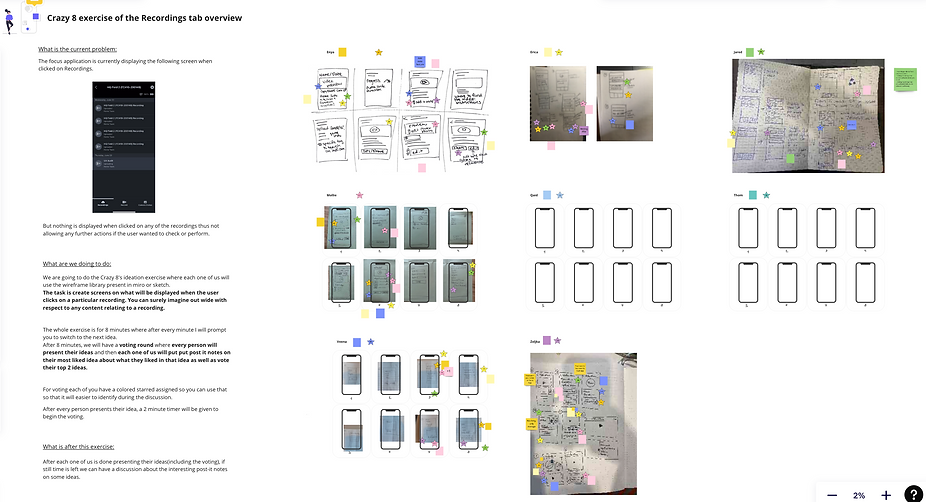
After gathering common insights based on feasibility and simplicity to use

1.
Variety of ideas on recordings' information screen
2.
Suggestion to include Hudl Assist as a feature
3.
Providing highlights and short clips in the recordings information screen.
4.
Features like edit, share & remove/delete recording were represented
Ideation
The designs I created were made accordingly to Uniform (Hudl's design system) to maintain design consistency. I created elements that are easily navigated, with a fast click rate & simple icons that are recognizable & comprehensible to the user about its actions.
Iterative designing
The whole designing process went on to create three design iterations :
-
Incorporating ideas derived from the Crazy 8's session & the UX audit.
-
The process of segregation consisted of minor adjustments and the selection of specific screens.
-
More refinement with the goal in mind to have basic user interactions and more access to recordings.
.png)
The visual designs shown represent iterations of screens related to the recordings tab
Design Prototypes
After iterative designing on Figma and cross-consulting with designers, the third design iteration took me to decide upon 2 main hi-fi interactive, clickable design prototype flows on Figma.
1st design flow👉🏼
This design flow has three functionalities :
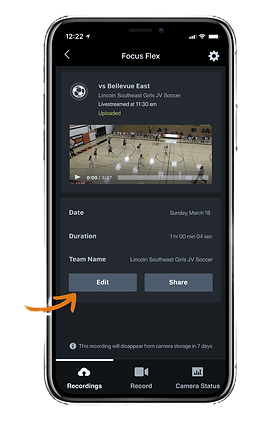
1. Edit - Make changes to details & save it
2. Share - Ability to send directly from the Focus App to anyone
3. Archive - Can remove the recording from your camera storage if not needed
The user can view the recording details & also play the recording which redirects to the Hudl app.
2nd design flow👉🏼
This design flow has just two functionalities :
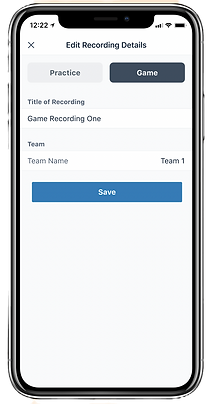
1. Edit - Make changes to details & save it
2. Share - Ability to send directly from the Focus App to anyone
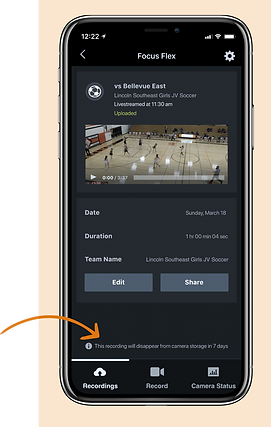
Instead of an archive option, I decided to display a message at the bottom of the information screen with “number of days” changing dynamically.
Usability testing
I set up a hi-fi interactive, clickable prototype using Figma to help aid the user conversations and also provide usability insights for user testing.
The testing sessions were conducted in A/B style testing with two scenarios, which were later used to distinguish the results. They were conducted with 10 different sets of users- internal & external. This was done to understand their approach, needs, and pain points for the recordings tab.
Two use case scenarios were drafted from the design flows:
-
Scenario: The user needs to interact with a recording using the features edit, share & archive.
-
Scenario: The user needs to interact with one of the recordings using the features edit, and share.
Insights
1.
The fact that coaches can access recording details with just one click was appreciated. It provided them to check out all the functionalities that are visible, simple, and easy to use for example the button to perform a share action.
3.
The share functionality was the most liked feature among all the features and the coaches really intend to get it implemented.
2.
The coaches preferred the feature of automatic deletion of recordings within predefined number of days instead of having the archive option.
4.
Coaches suggested adding an option to directly upload the recording to Hudl Assist for more ease as well as including the game score & colors of the team uniforms on the editing page would be helpful.
5.
The coaches verified details like the recordingsʼ name, recording type, and team name present on the edit page as sufficient and important.
User mindsets
🙌🏼
" But it's simple, simple as good. I think the, the decision on whether we essentially auto archives off the camera, I think is where we would lean to not have to manually do that. "
-Jon Kiester, Soccer coach for Northwest Elite
⏱️
"I don't think that there's a, like a bad way to do it. I think both are good. I think the archive part would just, for me, would be the best option of the two."
-Zach Barnes, Graduate manager at Creighton University
📱
"...it's just right there and hitting me right in the face, I'd probably just click on that button, edit the video, be able to submit the huddle, assist, see what team it's going to done."
-Dan Pennisi, Assistant Men's Soccer coach at NWU
Final design solution
From A/B testing the high-fidelity prototypes with 10 users, we got many common insights, and those incorporated helped to finalize the final design solution.
7 out of 10 users liked the 2nd design flow due to :
-
It's a much simpler design with fast access to the recording in just one click
-
Not having to remove recordings on their own.

Recordings Tab screen
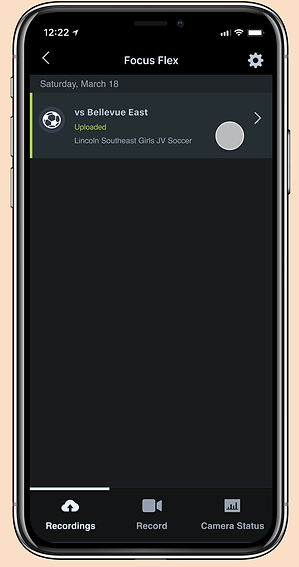
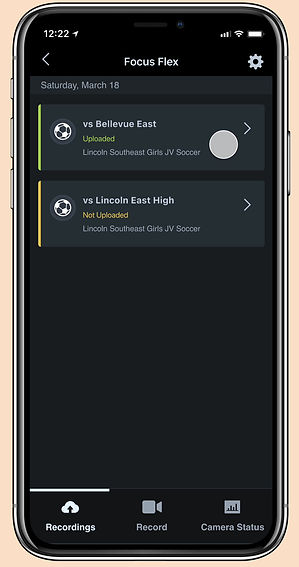
A list of recordings is shown with an upload/not uploaded status and an option to check more information out for that recording using the arrow.
Edit recording details
Basic information inputted before starting the recording can be edited here.

Share recording
This option will allow sharing the recording to any video-sharing application present on the user's mobile.
Automatic deletion of recording
A message stating the number of days (which is dynamic) left for the recording to be deleted from the camera storage.
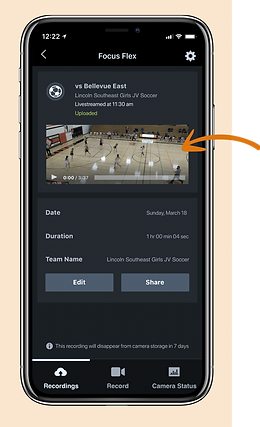
Play recording
Once a user clicks on play, they will be redirected to the Hudl application to watch the recording preview.
Impact of my work
The Focus Flex camera was released early this year with new updates in the Focus mobile application including my redesigned segment of the recordings tab.
Hudl hardware team used these designs in beta testing as well as with the release of the Focus Flex camera. With immense iterative testing on soccer fields, with soccer coaches & various school clubs, I have been able to create a difference for various flex customers.
Since 3.5 months of release...

700+ flex cameras

used by 🏃🏻♂️
1400+ customers 👥
in 👀
320 soccer clubs 🏈
2200 recordings a month

20 recordings a month


Total = 4858 recordings in a year & growing...
Information has been gathered from recent focus flex market data metrics
Future scope
There were suggestions to add features like:
-
An option to submit the game/practice game recordings to Hudl Assist directly.
-
Automatically creating highlights and important clips for each player
-
Adding more information in the recordings information screen like the uniform color of both the teams, jersey numbers, and game score for better game analysis
Including the above features in the mobile Hudl Focus application will require ML & AI technology which Hudl is working on bringing into the market soon.
Learnings
This internship project was a fantastic experience.
-
Helped me explore the process of product design in a real-world scenario.
-
Gained a lot of confidence & improved as a designer and as a leader which will help me take forward in my next roles.
Product design process
The whole design process was very iterative making me waver from my own bias without losing the main focus on the concept. The huge responsibility of redesigning a part of the application did make me overwhelmed and hesitant but as it kept going I was learning and getting on board with everything.
Users are the key to approving your designs
I understood how the user's close input played an important role in creating & refining a product. The user testing process taught me how to be vocal with the users about their concerns and also be able to amalgamate their feedback into its implementation.
Thank You for reading!
If you want to continue exploring more of my work 👇🏼